Release Notes
February 2020
What's New
For our February 2020 release, we’re introducing three new features in KACE Cloud Mobile Device Manager:
Multi-Forest LDAP Sync Support The new version of our LDAP Sync Service lets an administrator configure synchronization of multiple active directory forests within a single KACE Cloud MDM tenant. In the previous version of the LDAP Sync Client, an admin could install a single instance across the client and sync the active directory domains accessible through that single instance.
macOS Active Directory Profile Support lets admins create new active directory configurations in KACE Cloud MDM. It also increases security by allowing admins to give domain users full access to a FileVault-encrypted macOS device using bootstrap tokens.
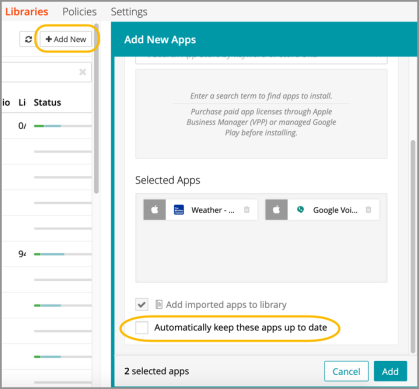
App Update Management enhancements give admins added control by allowing them to manually update app versions and push them to devices. An admin can multi-select devices from both iOS and Android to see which apps are out of date, and set apps for automatic updates in the future.
We’ve also added functional enhancements that include:
- Work profile support for Android 10
- Wallpaper configuration for company-owned Android devices
- Improved support for iOS 13 and DEP Profiles
New Features
Multi-Forest LDAP Sync Support
With multi-forest support, administrators can install an instance of the LDAP client onto each forest they want to sync with KACE Cloud MDM. To access this functionality, admins will need to download the latest version of the LDAP Sync Service.
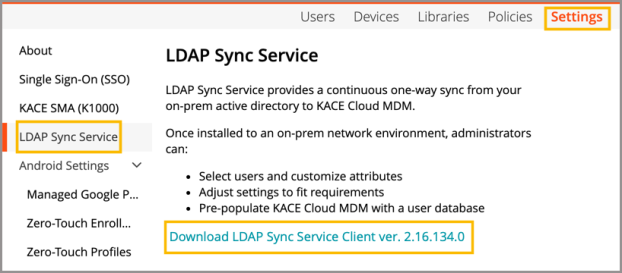
Existing Tenants - To upgrade the previously installed version of LDAP Sync Service, download version 2.16.134.0 now available in KACE Cloud MDM. See Configure LDAP Sync Service.
New Tenants - When using the upgraded LDAP Sync Client for a new tenant, an admin can follow the primary set-up instructions in our Configure LDAP Sync Service documentation that begins with downloading the most recent version of the client in KACE Cloud MDM (2.16.134.0).
macOS Active Directory Profile Support
New macOS Active Directory configurations can be created in the library, then applied to devices. Active Directory configurations can also be applied to one or more devices using a policy.
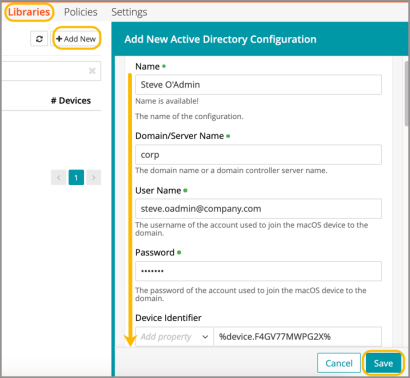
With the release of macOS 10.15 (Catalina), bootstrap tokens will be added to all DEP devices. These tokens give all network users (e.g., Active Directory users) automatic access to FileVault.
Learn more about macOS Active Directory Configuration.
App Update Management
Admins now have more control over when new versions of apps are pushed to devices. With our new app updating functionality, admins can set automatic updates for new app versions during the 'Add New Apps' process.
Admins also have a manual option if they’d like to push updates to some or all of their devices sooner than their daily scheduled update.
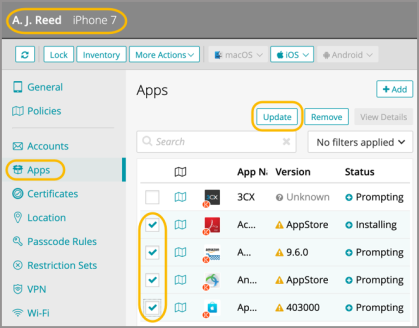
Learn more about the App Update Management for iOS and Android.
Resolved Issues
Bug fixes are included in the resolved issues list for two release periods and are then retired.
| Issue | Description | Status |
| ESMCL-3630 Android Enrollment Timeout | Android enrollment could time out if the subscription contained complex policies or smart labels. | FIXED |
| ESMCL-3598 Checking “Allow access only to specified bookmarked URLs” restriction. | When editing an iOS restriction set in the library, checking the restriction “Allow access only to specified bookmarked URLs” would cause JavaScript errors. | FIXED |
| ESMCL-3576 Manual Label - Does Not Update Policy | Adding a user to a manual label associated with a policy does not update policy | FIXED |
| ESMCL-3575 User account used during reenroll | Wrong user account used during reenroll if user was deleted and recreated | FIXED |
| ESMCL-3572 Unenrolled and deleted devices in inventory | Unenrolled and deleted device gets marked as enrolled on next inventory | FIXED |
| ESMCL-3536 Android Restrictions: App package picker | App package picker in Android Restrictions shows iOS apps | FIXED |
| ESMCL-3556 Unenroll commands: Initiating user | Initiating user for unenroll commands is not tracked | FIXED |
| ESMCL-3555 VPP synchronization to Apple | VPP synchronization to Apple only updates apps in the US store | FIXED |
| ESMCL-3554 Managed app configuration viewport | Managed app configuration viewport is too small | FIXED |
| ESMCL-3551 DEP Sync - Asset Tag Field | DEP Sync is clearing the asset tag field | FIXED |
| ESMCL-3548 VPN library config | VPN library config doesn't allow a colon | FIXED |
| ESMCL-3541 Never allow tracking suspension | Suspend tracking switch is available even though the admin selects to never allow tracking suspension | FIXED |
| ESMCL-3534 App Store clarify free vs paid apps | UI: update app store import to clarify free vs paid apps | FIXED |
| ESMCL-3532 App Library Picker in Restrictions | App Library picker in restrictions shows app entries for each app configuration | FIXED |
| ESMCL-3515 Cancel edit of ZTE or DEP profile | UI: Cancel edit of ZTE or DEP profile puts UI in useless state | FIXED |
| ESMCL-3419 VPP: "UPDATE_APP Notification | Notification shows "UPDATE_APP" in text | FIXED |
| ESMCL-3414 Multiple "Default settings" config | Multiple "Default settings" configs created after VPP sync | FIXED |
| ESMCL-3361 Enrolling an iPad running iPadOS | Enrolling an iPad running iPadOS displays wrong message after initial profile | FIXED |
| ESMCL-2876 DEP Full Re-Sync | Need DEP sync button to do full re-sync | FIXED |
Known Issues
Additional Resources
Getting Started with KACE Cloud MDM
© 2020 Quest Software Inc.
ALL RIGHTS RESERVED.
This guide contains proprietary information protected by copyright. The software described in this guide is furnished under a software license or nondisclosure agreement. This software may be used or copied only in accordance with the terms of the applicable agreement. No part of this guide may be reproduced or transmitted in any form or by any means, electronic or mechanical, including photocopying and recording for any purpose other than the purchaser’s personal use without the written permission of Quest Software Inc.
The information in this document is provided in connection with Quest Software products. No license, express or implied, by estoppel or otherwise, to any intellectual property right is granted by this document or in connection with the sale of Quest Software products. EXCEPT AS SET FORTH IN THE TERMS AND CONDITIONS AS SPECIFIED IN THE LICENSE AGREEMENT FOR THIS PRODUCT, QUEST SOFTWARE ASSUMES NO LIABILITY WHATSOEVER AND DISCLAIMS ANY EXPRESS, IMPLIED OR STATUTORY WARRANTY RELATING TO ITS PRODUCTS INCLUDING, BUT NOT LIMITED TO, THE IMPLIED WARRANTY OF MERCHANTABILITY, FITNESS FOR A PARTICULAR PURPOSE, OR NON-INFRINGEMENT. IN NO EVENT SHALL QUEST SOFTWARE BE LIABLE FOR ANY DIRECT, INDIRECT, CONSEQUENTIAL, PUNITIVE, SPECIAL OR INCIDENTAL DAMAGES (INCLUDING, WITHOUT LIMITATION, DAMAGES FOR LOSS OF PROFITS, BUSINESS INTERRUPTION OR LOSS OF INFORMATION) ARISING OUT OF THE USE OR INABILITY TO USE THIS DOCUMENT, EVEN IF QUEST SOFTWARE HAS BEEN ADVISED OF THE POSSIBILITY OF SUCH DAMAGES. Quest Software makes no representations or warranties with respect to the accuracy or completeness of the contents of this document and reserves the right to make changes to specifications and product descriptions at any time without notice. Quest Software does not make any commitment to update the information contained in this document.
If you have any questions regarding your potential use of this material, contact:
Quest Software Inc.
Attn: LEGAL Dept.
4 Polaris Way
Aliso Viejo, CA 92656
Refer to our website (www.quest.com) for regional and international office information.
Patents
Quest Software is proud of our advanced technology. Patents and pending patents may apply to this product. For the most current information about applicable patents for this product, please visit our website at www.quest.com/legal.
Trademarks
Quest and the Quest logo are trademarks and registered trademarks of Quest Software Inc. in the U.S.A. and other countries. For a complete list of Quest Software trademarks, please visit our website at www.quest.com/legal. All other trademarks, servicemarks, registered trademarks, and registered servicemarks are the property of their respective owners.